Published on July 26, 2009 by omahinfo
Telnet
Telnet atau Terminal Emulation adalah program yang memungkinkan anda untuk mengetikkan perintah seakan-akan anda berada pada mesin tersebut. Telnet menjadi tools yang banyak digunakan oleh hacker karena hampir semua OS mempunyai tools ini dan penggunaannya yang sangat sederhana.
Karena telnet mensimulasikan terminal, maka perintah-perintah yang anda lakukan akan menggunakan resource dari server secara penuh dan bukan resource dari computer client.
Telnet server digunakan oleh telnet client untuk mengeksekusi perintah dan bisa di install pada WinNT, Win2000, Linux, Unix, dll. Syntax penggunaan Telnet adalah :
C:\Telnet target port
Tracert
Tracert adalah utility yang digunakan untuk mengetahui tempat-tempat yang dilalui oleh suatu paket mencapai tujuannya. Dengan tracert anda bisa mengetahui lokasi-lokasi yang dilalui oleh suatu paket dan meneliti kecepatan serta masalah yang terjadi selama paket dalam perjalanan.
Tracert Tujuan
Netstat
Netstat adalah utility untuk mengetahui statistic dari protocol dan current state dari koneksi TCP/IP.
Nbstat
Nbstat adalah utility untuk mengecek koneksi Netbios over TCP/IP, update chace LMHOSTS dan scope ID.
SNMP
SNMP atau Simple Network Management Protokol adalah protocol yang digunakan untuk memonitor status komunikasi antara bermacam-macam host yang menggunakan protocol TCP/IP. Contoh yang bisa dimonitor oleh SNMP ini adalah :
*Komputer NT/W2K
*LAN Manager Server
*Router
*Gateways
*Mini Computer
*Mainframe
*Terminal Server
*Hubs
*Dll
2 Comments, Filed under:
Uncategorized Tags:
berinteraksi,
chace,
client,
command,
current,
emulation,
hacker,
host,
hubs,
ID,
install,
interaktive,
ip,
linux,
LMHOSTS,
manage,
management,
memonitor,
mengeksekusi,
mengetikkan,
mensimulasikan,
mesin,
mode,
nbstat,
Netbios,
netstat,
network,
next,
nslookup,
os,
over,
perintah berada,
perjalanan,
program,
protokol,
resource,
router,
scope,
sederhana,
server,
simple,
snmp,
state,
statistik,
syntak,
tcp,
Telnet,
terminal,
tools,
tracert,
unix,
update,
utility,
win2000,
winnt
Published on July 20, 2009 by omahinfo
Telnet
Telnet atau Terminal Emulation adalah program yang memungkinkan anda untuk mengetikkan perintah seakan-akan anda berada pada mesin tersebut. Telnet menjadi tools yang banyak digunakan oleh hacker karena hampir semua OS mempunyai tools ini dan penggunaannya yang sangat sederhana.
Karena telnet mensimulasikan terminal, maka perintah-perintah yang anda lakukan akan menggunakan resource dari server secara penuh dan bukan resource dari computer client.
Telnet server digunakan oleh telnet client untuk mengeksekusi perintah dan bisa di install pada WinNT, Win2000, Linux, Unix, dll. Syntak penggunaan Telnet adalah :
C:\>Telnet target port
Nslookup
Nslookup adalah tools yang dibuat untuk berinteraksi dengan DNS yang bisa digunakan dengan 2 mode, yaitu interactive dan command mode. Contoh penggunaan NSLookup pada command mode :
Nslookup host
Tracert
Tracert adalah utility yang digunakan untuk mengetahui tempat-tempat yang dilalui oleh suatu paket mencapai tujuannya. Dengan tracert anda bisa mengetahui lokasi-lokasi yang dilalui oleh suatu paket dan meneliti kecepatan serta masalah yang terjadi selama paket dalam perjalanan.
Tracert tujuan
Netstat
Netstat adalah utility untuk mengetahui statistic dari protocol dan current state dari koneksi TCP/IP.
Nbstat
Nbstat adalah utility untuk mengecek koneksi Netbios over TCP/IP, update chace LMHOSTS dan scope ID.
SNMP
SNMP atau Simple Network Management Protokol adalah protocol yang digunakan untuk memonitor status komunikasi antara bermacam-macam host yang menggunakan protocol TCP/IP. Contoh yang bisa dimonitor oleh SNMP ini adalah :
*Komputer NT/W2K
*LAN Manager Server
*Router
*Gateways
*Mini Computer
*Mainframe
*Terminal Server
*Hubs
*DLL
6 Comments, Filed under:
Uncategorized Tags:
berada,
berinteraksi,
chace,
client,
command,
computer,
current,
digunakan,
emulation,
gateways,
hacker,
interactive,
ip,
kecepatan,
komunikasi,
koneksi,
lakukan,
linux,
lokasi,
mainframe,
management,
manager,
memonitor,
memungkinkan,
meneliti,
mengecek,
mengeksekusi,
mengetahui,
mengetikkan,
mensimulasikan,
mesin,
mode,
nbstat,
Netbios,
network,
os,
over,
paket,
penggunaan,
penggunaannya,
perintah,
program,
protokol,
resource,
router,
scope,
sederhana,
server,
simple,
state,
statistic,
status,
syntak,
tcp,
Telnet,
tempat,
terminal,
tools,
tracert,
tujuan,
unix,
update,
win2000,
winnt
Published on June 20, 2009 by omahinfo
TCP/UDP adalah delivery service yang reliable atau sering disebut sebagai connection-oriented delivery service. TCP harus melakukan koneksi dengan tujuan terlebih dahulu sebelum bisa terjadi pertukaran data atau komunikasi data. Setiap data yang telah dikirim oleh TCP akan direspon oleh target dengan ACK yang menandakan data telah diterima dengan baik dan sebaliknya jika tidak didapatkan ACK maka data dianggap gagal dan akan dikirim ulang.
|
Ports
|
Deskripsi
|
|
21
|
FTP
|
|
23
|
Telnet
|
|
139
|
Netbios Session Service
|
UDP adalah delivery service yang tidak reliable dan sering disebut sebagai connectionless datagram service. Karena UDP tidak memerlukan terjadinya koneksi terlebih dahulu seperti pada TCP, UDP memberikan delivery yang lebih cepat walaupun tidak reliable. Service yang menggunakan UDP ini adalah Netbios name service dan SNMP. Service yang menggunakan UDP :
|
Port
|
Keyword
|
Deskripsi
|
|
15
|
NETSTAT
|
Network Status
|
|
53
|
DOMAIN
|
Domain Name Server
|
|
69
|
TFTP
|
Trivial File Transfer Protokol
|
|
137
|
NETBIOS-NS
|
Netbios Name Service
|
|
138
|
NETBIOS-DGM
|
Netbios Datagram Service
|
|
161
|
SNMP
|
SNMP Network Monitor
|
Post comment, Filed under:
Uncategorized Tags:
ACK,
connection,
connectionless,
data,
datagram,
delivery,
deskripsi,
dianggap,
dikirm,
domain,
FTP,
gagal,
keyword,
komunikasi,
koneksi,
menandakan,
menggunakan,
name,
Netbios,
netstat,
network,
next,
oriented,
pertukaran,
ports,
prots,
reliable,
respon,
server,
service,
session,
snmp,
status,
target,
tcp,
Telnet,
tujuan,
UDP,
ulang
Published on June 19, 2009 by omahinfo
 Ketika anda melihat suatu alamat IP yang tediri atas format ww.xx.yy.zz sebenarnya alamat IP tersebut bisa dibagi menjadi 2 bagian, yaitu bagian yang dinamakan sebagai Network ID dan Host ID.
Network ID merupakan nomor yang harus sama dalam suatu jaringan yang sama sehingga computer bisa saling berkomunikasi.
Host ID merupakan nomor yang harus unik dalam suatu jaringan jika terdapat Host ID yang sama maka akan terjadi bentrok di network sehingga salah satu computer menjadi tidak bisa berkomunikasi.
Secara default pembagian network ID dan host ID pada class A, B, dan C adalah sebagai berikut :
Class A NetID, HostID, HostID, HostID
Class B NetID, NetID, HostID, HostID
Class C NetID, NetID, NetID, HostID
Subnet Mask
Karena perkembangan dari alamat IP yang berkembang begitu pesat dan mengakibatkan cepatnya IP yang habis terpakai maka dibulatkan konsep network mask atau yang sering disebut sebagai subnet mask. Subnet mask default untuk class network adalah sebagai berikut ini :
*Class A : 255.0.0.0
*Class B : 255.255.0.0
*Class C : 255.255.255.0
Fungsi dari subnet mask adalah untuk membagi antara NetID dan HostID default.
Post comment, Filed under:
Uncategorized Tags:
alamat,
bagian,
bentrok,
berkomunikasi,
cepat,
class,
default,
dibulatkan,
format,
host,
ID,
ip,
jaringan,
Komputer,
mask,
melihat,
network,
next,
nomor,
pembagian,
subnet,
terbagi,
unik
Published on June 19, 2009 by omahinfo
 The Internet is the name for a group of worldwide information resources. These resources are so vast as to be well beyond the comprehension of a single human being. Not only is there no one who understands all of the Internet, there is no one who even understands most of the Internet. The Internet is often thought of as a global network of computers, or as a group of computer networks worldwide. The computer networks are simply the medium that carries the information. The beauty and utility of the Internet lie in the information itself that is being transmitted.
The Internet has undergone a remarkable transformation since its early days. Originally, the Internet was a low-speed, text-based network used to connect a few government sites to the research and defense contracting community. The Internet came into existence by the U.S. Department of Defense project called ARPAnet(Advanced Research Project Agency Network) in the late 1960’s. It was designed by network architects to interconnect government computers with defense contractors. The design of the network was such that no single computer system would be dependent on any other computer systems within the network.
In the 1970’s, the Internet began to be interconnected with large universities and research organizations. The type of information going across the Internet began to change from being defense oriented to that of research oriented, during the 1980’s, more universities and government contractors began using the internet, contributing to its growth. As the amount of network traffics increased, the speed of the Internet began to slow down. In the mid-1980’s, the U.S. Department of Defense split up the network into the ARPAnet and the MilNet. The MilNet consist of only traffic to and from military sites and other government locations vital for national defence. The National Science Foundation (NSF) took over ARPAnet and merged it into a high-speed network called NSFnet.
The NSFnet was the prototype for the Internet infrastructure that we have today. It provided high-speed links among scientists and supercomputing facilities and served as the main Internet traffic arteries for the United States. People at universities and elsewhere immediately began using the increased speed for everything other than supercomputing. In 1995, the NSF handed over control of the Internet to commercial carries.
In the last couple of years Internet usage has shifted from universities to commercial use. This shift came about with the development of the World Wide Web by CERN (the high-energy physics research institute in Geneva, Switzerland). Coupled with this came the development of the first practical web browser, Mosaic, from the National Center for Supercomputing Applications (NCSA).
Web browsers allowed people to explore the resources of the Internet in a way that was far easier than the original text-based applications like FTP (file transfer protocol), Gopher (a search engine) and Telnet (remote access of a computer). As more people become interested in the Internet, the more web browsers were developed and came into use. The popular web browsers in use today are Netscape Navigator and Microsoft’s Internet Explorer. Web browsers were developed that were more graphics oriented and easier to use than the old text based applications.
Today, the Internet is being used by people from all walks of life. The Internet is like a 24-hour library that is never closed, with countless books and resources in almost any language of your choice.
Post comment, Filed under:
Uncategorized Tags:
across,
architects,
ARPAnet,
beauty,
beyond,
carries,
community,
comprehension,
contracting,
day,
defense,
even,
existence,
Global,
group,
human,
information,
interconnect,
Internet,
lie,
low,
medium,
military,
MilNet,
national,
network,
next,
organizations,
originally,
prototype,
remarkable,
resources,
simply,
single,
speed,
split up,
system,
text,
traffics,
transformation,
transmitted,
undergone,
understand,
utility,
vast,
well,
worldwide
Published on June 17, 2009 by omahinfo
Melanjutkan dari artikel Instalasi dan Konfigurasi TCP/IP, kali ini saya akan menerangkan tentang pengelompokan IP Network. Untuk menentukan posisi Network ID dan Class ID , TCP/IP terbagi atas 5 class, tetapi karena sampai saat ini yang dipakai 3 class maka sering dikatakan bahwa TCP/IP dibagi atas 3 class yaitu :
|
Class
|
Dari
|
Sampai dengan
|
Jumlah NetID
|
Jumlah Host ID
|
|
A
|
1
|
126
|
126
|
16.277.214
|
|
B
|
128
|
191
|
16.384
|
65.543
|
|
C
|
192
|
223
|
2.097.152
|
254
|
|
D
|
Reserved
|
|
|
|
|
E
|
Reserved
|
|
|
|
Beberapa no IP disediakan khusus digunakan untuk internal sehingga no IP tersebut tidak akan anda temui di internet. Adapun IP yang telah disediakan ini adalah 127.0.0.1 sebagai loopback IP khusus yang digunakan untuk internal Network yang tidak akan konflik dengan eksternal IP di internet yaitu :
10.0.0.1 s/d 10.255.255.254
172.16.0.1 s/d 172.31.255.254
192.168.0.1 s/d 192.168.255.254
No IP 127 merupakan alamat IP yang khusus dan digunakan secara internal oleh computer misalkan untuk komunikasi antar service dengan menggunakan protocol TCP/IP. Alamat 127 ini tidak melalui network adapter dan melakukan route langsung kembali ke dirinya sendiri. Jika anda tidak mempunyai ethernet adapter sedangkan OS mengharuskan anda menginstalasi Ethernet adapter, maka anda bisa menginstall Loopback adapter.
2 Comments, Filed under:
Uncategorized Tags:
adapter,
Artikel,
class,
ID,
instalasi,
internal,
Internet,
ip,
konfigurasi,
konflik,
loopback,
melanjutkan,
menentukan,
menerangkan,
menginstall,
network,
next,
os,
pengelompokan,
posisi,
reserved,
service,
tcp
Published on June 17, 2009 by omahinfo
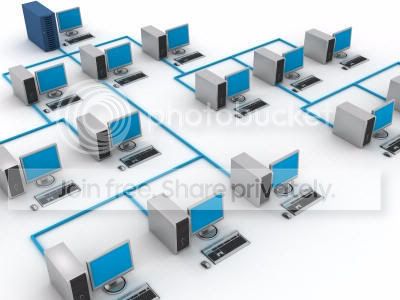 As we advance towards a paper-less society, the need for people to have easy and complete access to data as quickly as an exchange of papers by hand increases. This is where network computers come in. Computers connected together by a network system affords users the convenience of such access so that as soon as data is entered into one computer, it can be immediately retrieved by someone else on a connected computer, no matter how far away it may be.
How does a computer network actually work? Well, for one thing, there is some mathematics involved in the setting up of a network.
The first question is very basic: how many computer will be connected to this network and how many guest computers might be added on at one time? An example of a guest computer is a laptop connected to the network for a short while to download or access data.
The answer to the above solves the problem of how many permanent user files and guest files you have to create on the main computer, or the server. The guest files will all be generically named so that all guests have the same access privileges, while the user files will have distinct names so that they can have more personalized access privileges. These user and guests files on the server are preprogrammed to control all access privileges.
The physical side of computer networking involves problems such as how many feet of cable are you going to need to connect the computers. Some large office buildings can have a mile of cable between their networked computers! The mathematics here is simple enough. Just measure the length of cable required!
A much faster way of networking as compared to a cable connection is through infrared data transfer (IDT). But, of course this is only possible between two computers at a time in close proximity.
This is accomplished by hooking up the computers with infrared devices (IRD) and both these devices have to be in lline with one another for infrared connectivity. Again, mathematics is involved here as well. Firstly, you need to gauge the optimal distance between the two computers for IDT. If the distance is too far, there will be frequent interruptions and disconnections. Then, there is the question of lumens (measure of brightness of the infrared light) emitted from the infrared panel. This is very critical as using less lumens on fast computers would result in system crashes while using more lumens on slower computers would result in garbled transfers
56 Comments, Filed under:
Uncategorized Tags:
access,
accomplished,
actually,
advance,
affords,
brightness,
cable,
computers,
connected,
control,
convenience,
crashes,
critical,
data,
disconections,
distance,
distinct,
Download,
emitted,
entered,
exchange,
feet,
garbled,
gauge,
hooking up,
immediately,
increases,
infrared,
interruptions,
IRD,
less,
lumens,
measure,
network,
next,
paper,
permanent,
personalized,
physical,
preprogrammed,
proximity,
quickly,
required,
result,
retrieved,
society,
system,
together,
towards,
transfer,
work
